Workday to SAP Migration: A Complete Project Guide
- Pranav Padmane
- 4 days ago
- 3 min read

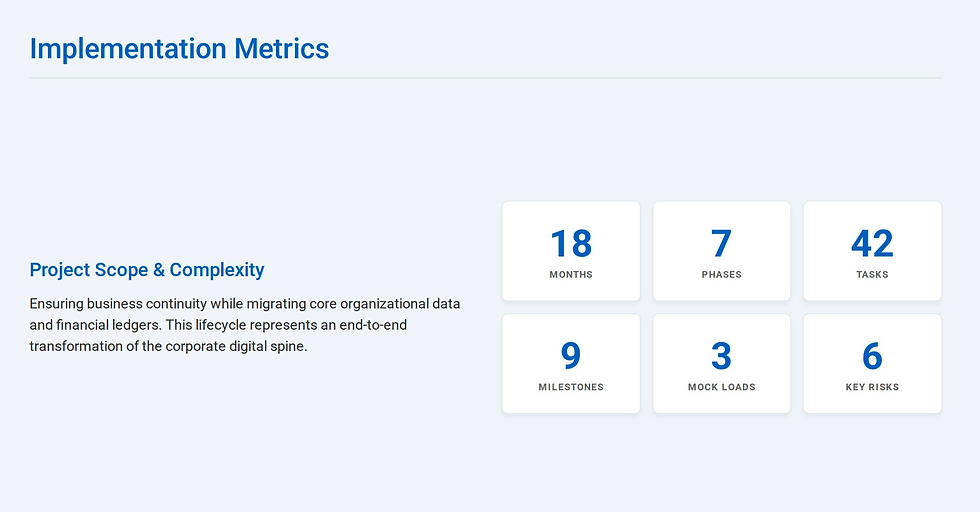
Migrating from Workday to SAP is one of the most complex enterprise transformations an organization can undertake. Both platforms are best-in-class, but they serve different strategic strengths — and moving between them requires meticulous planning across people, process, data, and technology. This guide walks through every major phase of a Workday-to-SAP migration, from the first stakeholder conversation to post-go-live steady state.
Why organizations migrate from Workday to SAP
Organizations typically make this move when they need deeper ERP integration across supply chain, manufacturing, or financials — areas where SAP S/4HANA has historically been stronger. Others migrate as part of a broader Oracle or SAP enterprise consolidation strategy. In healthcare and life sciences, SAP's compliance and audit capabilities are often a deciding factor.
Phase 1: Requirements and discovery (Months 1–2)
Every successful migration starts with a solid foundation. This phase involves identifying all stakeholders and building a RACI matrix, documenting current-state Workday processes across HCM and Financials, running business requirements workshops, and completing a formal gap analysis between Workday and SAP capabilities. Data inventory and sign-off on the requirements document close out this phase. Skipping thorough discovery here is the single most common cause of scope creep later.
Phase 2: Solution design and architecture (Months 2–4)
The design phase translates requirements into the SAP technical landscape. Key decisions include SAP S/4HANA system landscape design, integration architecture (APIs, middleware such as MuleSoft or Dell Boomi), data migration strategy, security and authorization model, and the all-important cutover and rollback plan. Design documents must be signed off by both technical leadership and executive sponsors before moving forward.
Phase 3: Environment setup and infrastructure (Months 3–5)
SAP S/4HANA provisioning across Dev, QA, UAT, and Production environments happens in parallel with design finalization. Network connectivity, identity and SSO integration, and monitoring and alerting setup are all completed here. Infrastructure readiness is a prerequisite for every downstream workstream.
Phase 4: Data migration and ETL (Months 4–10)
Data migration is the longest and riskiest phase of any Workday-to-SAP project. It begins with extraction from Workday via APIs (simplexml and REST), followed by cleansing, deduplication, and transformation to SAP's data model. Three mock migration loads with full reconciliation against source system counts are strongly recommended. Delta and incremental load design caps the phase, along with formal business sign-off on migration accuracy.
Phase 5: Configuration and development (Months 5–12)
This is the largest phase by effort. SAP FI/CO, HCM/SuccessFactors, and MM/SD/SCM modules are configured by functional consultants. Custom ABAP development and BTP extensions are built by the development team. Integration pipelines connecting SAP to payroll providers, banks, and other third-party systems are developed and unit tested. SAP Analytics Cloud reports and dashboards replace Workday's reporting layer.
Phase 6: Testing — SIT, UAT, and performance (Months 11–15)
System Integration Testing validates that all components work together. User Acceptance Testing brings business users into the process to validate real-world scenarios. Performance and load testing confirms the system can handle production volumes. Security penetration testing closes any authorization gaps. Formal UAT sign-off by business sponsors is mandatory before cutover planning begins.
Phase 7: Training, cutover, and go-live (Months 15–18)
End-user training is delivered by role — finance, HR, procurement, and operations each receive tailored instruction. A cutover rehearsal (dress rehearsal) validates the technical runbook. The final data migration load happens over a controlled cutover weekend, followed by a 30-day hypercare window where the full project team supports production. Project closure and handover to operations concludes the engagement.
Key risks to manage
The most frequently cited risks in Workday-to-SAP migrations are data quality issues discovered late, integration complexity with third-party systems, scope creep from business units requesting additional modules mid-project, change resistance from teams deeply familiar with Workday, and go-live timing conflicts with fiscal year-end or payroll cycles. Each risk should have a named owner and mitigation strategy documented in the risk register from day one.
Final thoughts
A Workday-to-SAP migration is an 18-month commitment that touches every corner of the business. Success comes from locking scope early, auditing data before a single configuration session, running change management from month one, and treating the cutover rehearsal as a real go-live. Organizations that invest in governance and structured program management consistently outperform those that treat it as a pure IT project.


Comments